

As an owner of a small business, it is critical to know if your website is just getting clicks or if those clicks are becoming customers.
Every small business owner wants to know several things about their website.
Who is visiting my website?
What are they doing when they are on my website?
How did they find my website?

Who is visiting my website?
How do you know who is visiting your website? It's not like they come to your website and fill out a form telling you everything about themselves. Even if you had a form, not everyone will fill it out. Maybe you should make it mandatory for them to fill it out before they can explore your website. That is just not going to happen. So, how does a small business owner get this important information?
Google Analytics is a FREE tool that gathers information about visitors to your website.
As a small business owner, it's important to know who is visiting your website. You likely have limited marketing resources, so it is important to know whether your ideal customer is visiting your website. What cities or countries are they coming from? Google Analytics answers these questions.
New visitors, or have they been to the website before?
If you offer a loyalty program or customer-specific discounts and pricing, this information matters even more. Likewise, if your business model has a long sales cycle, you'll want to know whether your ideal client returns often to learn more. If you sell a product or service with a long life cycle and customers buy it only every 10 years, you'll most likely want to know how many new visitors come to your website.
Google Analytics answers these questions for small business owners.
The screenshot below shows you exactly how many new and returning visitors visited your website.

You can also segment this by a particular city.
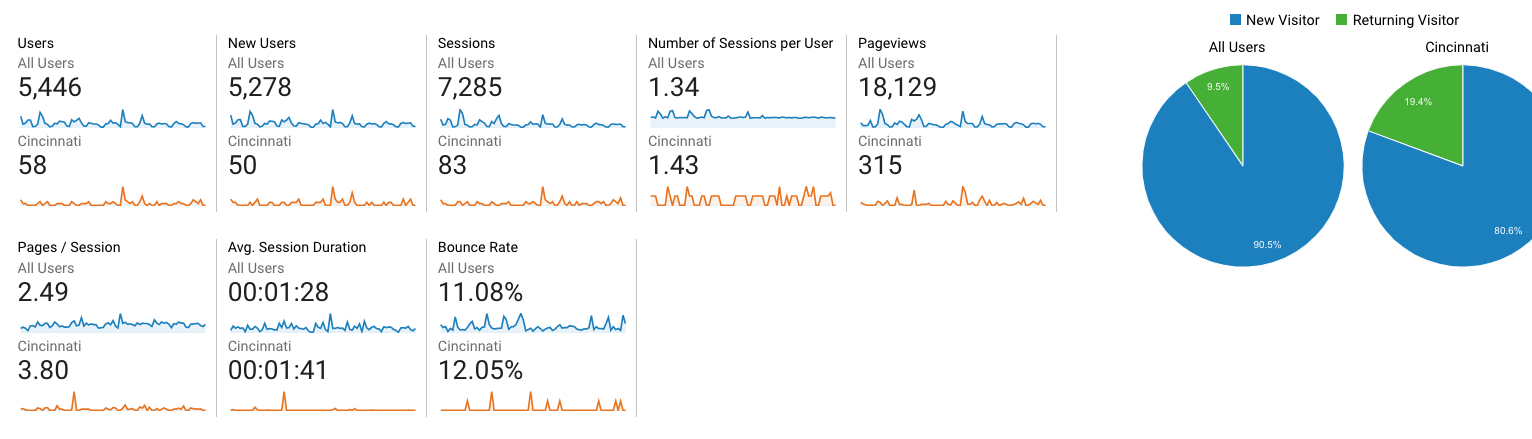
If you have a physical location or a specific service area, visitors by city is meaningful information to measure the effectiveness of your marketing.
Okay, Phil, you have convinced me I need this information to measure the marketing for my small business.
How do I get Google Analytics for my website?
Yes, it is free.
Click the image below to get started.

Installing something on your website, like Google Analytics, is often beyond the comfort zone of many small business owners.
Your web developer/designer should be able to do this for you. If not, contact Analytics That Profit, and we will help you.
Google Analytics helps small business owners to know if their marketing is working. Read How Do I Know If My Marketing Is Working?
What are they doing on my website?
What pages did they visit? How long did they stay? What links did they click? What information did they provide?
Google Analytics provides this information at no charge to small business owners. In Google Analytics, it's called Behavior.
You can see exactly which pages visitors view on your website.
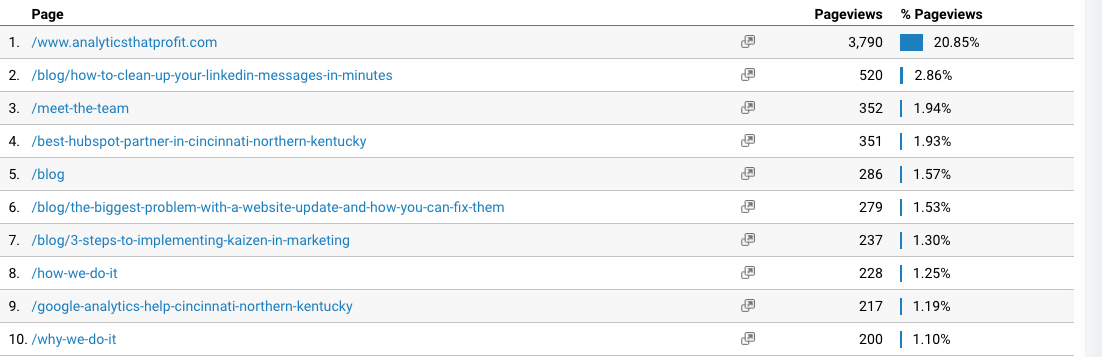
What if you want phone calls to your business? Can a small business owner get this information from Google Analytics? Yes, you can!
This is called an EVENT in Google Analytics.

Google Analytics also allows you to measure HIGH-VALUE events on your website. A HIGH-VALUE event could be a click to your Shopify or another purchasing platform.

Is the money you spent on content marketing working? Is anyone reading it?
You can also find this information in the Behavior section of Google Analytics.
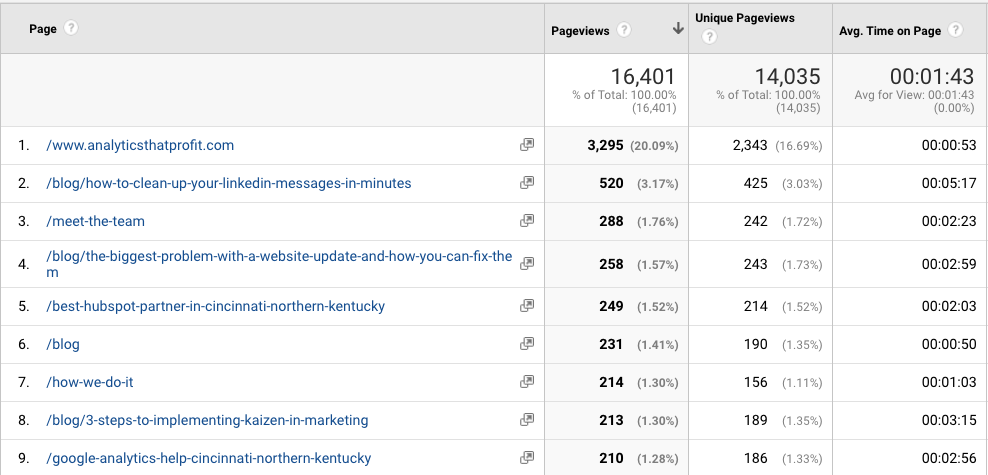
If your small business marketing budget includes blog and content creation, you want to know if anyone is reading it. Time on Page is a good indicator.
You also want visitors to take action on your website. Simply put, a Call to Action guides visitors to a form to request a quote, download a white paper, or move further along in the buying process. The effectiveness of your Call to Actions can be measured as GOALS in Google Analytics.

We recommend you read How To Calculate Marketing ROI. Using Google Analytics and Google Analytics is easy.
How did they find my website?
As a small business owner on a limited marketing budget, it is critical to know if your marketing dollars bring visitors to your website. Even more important, are you attracting your ideal client? If you have not identified your IDEAL CLIENT, you must read this great article by Betsy Kent.
You don't want everyone to visit your website. You want visitors who can purchase your product or service: Your ideal client.
In Google Analytics, you find out how visitors found your small business website. This is located under Acquisition.
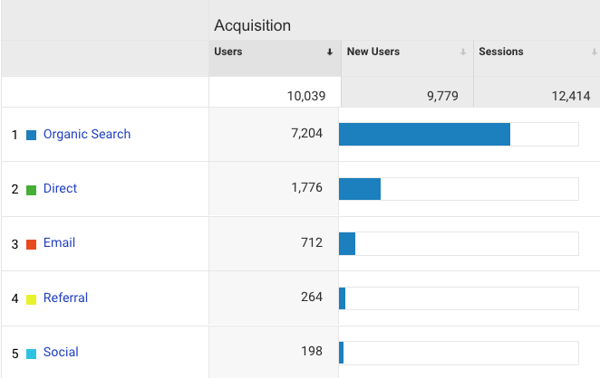
Organic Traffic - they found your website while searching for your product or service.
Direct- they had your website bookmarked or entered the address manually
Referral - these are links not on your website that direct traffic to your website.
Social - these are links you post on your social media that visitors click.
You can drill down into each acquisition source for more details.
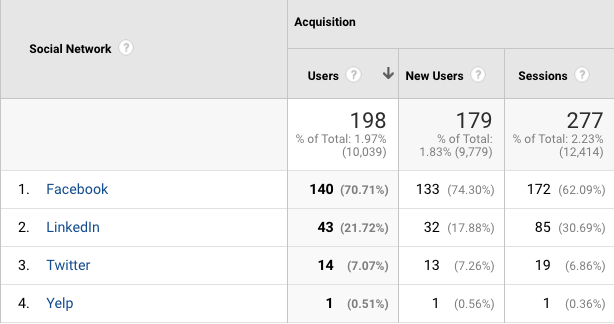
Now that you know how they got to the website, what search terms did they use?
Under Acquisition in Google Analytics, you will find Search Console. I believe this is the most powerful information for small business owners to evaluate content for effectiveness and find opportunities for new content. Inside Search Console, you will find Queries.
Queries are the words and phrases that allow your website to show up in search results.
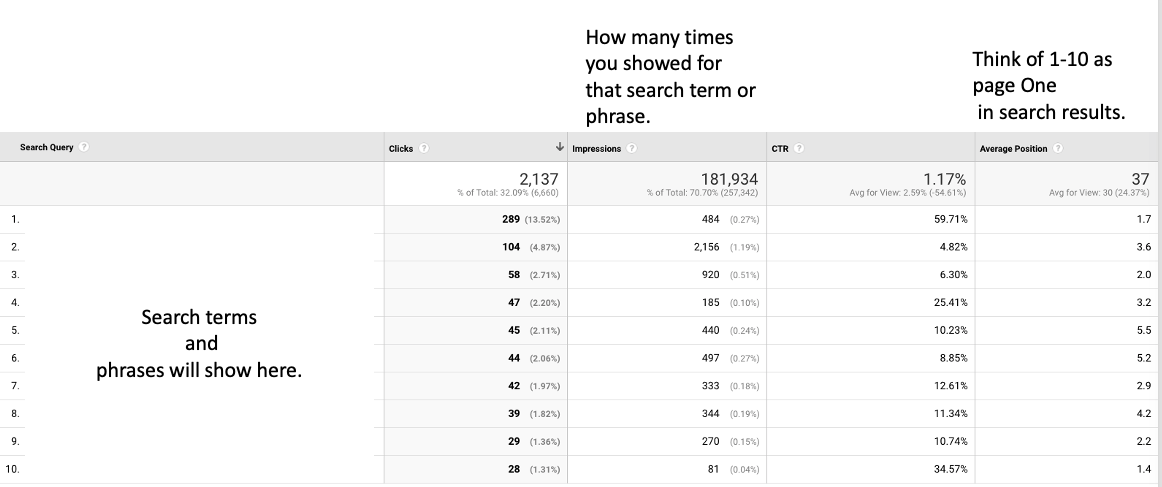
Queries in Search Console let you, as a small business owner, see whether your marketing spend is working. Clicks on search queries tell you exactly what potential customers were looking for when they searched. You should see queries that match your content. If you see many impressions and few clicks, you must reevaluate your marketing. High impressions and a low Click-Through Rate (CTR) tell you your content isn't compelling enough to make visitors click.
To improve your Click-Through Rate, read 3 Overlooked SEO Techniques For Small Business.
If you haven't figured it out by now, I am passionate about using Google Analytics to help small business owners evaluate their marketing effectiveness.