


Most homeowners start their electrician search online, usually on a phone and often in a hurry. Showing up in Google is only half the job. The other half is making it easy for them to call you and knowing which parts of your marketing make the phone ring.
This guide covers three things that consistently produce more calls for electrical contractors:
- A fully optimized Google Business Profile
- A website that's built for calling, on every device
- Call tracking, so you know what's working
Quick checklist
- Claim and complete every section of your Google Business Profile
- Choose "Electrician" as your primary category and list every area you serve
- Upload real photos of your team, vans, and completed jobs
- Ask for reviews and respond to every one
- Post updates and seasonal offers regularly
- Add a sticky "Call Now" button to your website's header or menu
- Put a clickable phone number in the footer of every page
- Test click-to-call on phones, tablets, and desktop
- Track phone number clicks in Google Tag Manager and Google Analytics
- Review your profile monthly and your website quarterly
Part 1: Optimize Your Google Business Profile for Local Calls
For electricians, your Google Business Profile is often the first thing a customer sees, before your website and sometimes instead of it.
A complete, active profile shows up more often in Google Maps and the local "map pack," and it puts a Call button one tap away.
Claim and complete every section
If you haven't claimed your listing, do it now. Then fill in everything:
- Business name, address, and phone number (NAP). Use your official business name, and keep these details identical everywhere they appear online so customers and Google can trust them.
- Primary category. Choose "Electrician." Add related secondary categories that fit your work, such as "Emergency Electrician" or "Lighting Contractor."
- Services. List each service you offer, like panel upgrades, EV charger installation, generator installation and troubleshooting.
- Service area. Add every city or zip code you serve so you can appear for "electrician near me" searches across your area.
- Hours and description. Keep your hours accurate, including emergency availability. Write a description that says what you do and where, in plain language.
Add real photos
Upload clear photos of your team, branded vans, safety gear, and completed jobs. Real photos build trust faster than stock images, and an active photo library signals to Google that the business is active.
Ask for reviews and respond to every one
Reviews build credibility and help your local ranking.
Ask satisfied customers to leave a review. Make it easy by texting or emailing them your review link after a job.
Respond to every review, positive and negative, professionally and promptly. It shows future customers how you treat people.
Post updates and offers
Use Google Posts to share seasonal safety checks, special offers, completed projects, and safety tips.
Regular posts show your business is active and give potential customers another reason to call you instead of the next listing.
Part 2: Make Your Website Call-Ready on Every Device
If a customer can't find your number instantly, they'll call the next electrician on the list.
Small website changes can quickly lift call volume, especially from mobile visitors.
Add a sticky header with a "Call Now" button
A sticky header or menu stays at the top of the screen as visitors scroll. Put a bright "Call Now" button or tap-to-call phone icon in it, so your number is always one tap away. That matters most for someone dealing with an outage or a tripped breaker.
- Code the number as a clickable
tel:link. - Use your local area code to reinforce that you're the local choice.
- Use action words, such as "Call Now for Fast Service" or "Speak to an Electrician."
Put a clickable phone number in the footer
Many visitors scroll to the bottom of the page looking for contact information.
Put a prominent, clickable phone number in the footer of every page, so customers can call whether they're on the homepage, a service page, or a blog post.
- Format the number the same way on every page.
- Use a contrasting color so it stands out.
- Add a short call to action, like "Available 24/7 for Emergencies" (only if you are).
Show your number wherever people decide
Beyond the header and footer, put your phone number near the places visitors make decisions: at the top of service pages, next to contact forms, and at the end of blog posts. The more places your number appears, the easier it is to call.
Design for mobile first
Many people looking for an electrician are searching on their phones. Test your site on phones, tablets and desktop. Your menu, buttons, and phone links should work perfectly on every screen size.
A button that doesn't work on mobile costs you calls you won't even know you missed.
Part 3: Track Phone Calls So You Know What's Working
More calls are good. Knowing which pages, searches, and campaigns produce them is better, because then you can do more of what works.
Track click-to-call buttons with Google Tag Manager
Set up a trigger in Google Tag Manager that fires when someone clicks a tel: link, and send it to Google Analytics 4 as an event, such as phone_click. In GA4, mark that event as a key event so it's counted as a lead.
You'll then be able to see:
- Which pages generate the most phone clicks
- Which traffic sources produce callers, such as Google search, Google Maps, ads, or social
- Whether service pages outperform your homepage
If service page visitors call more than homepage visitors, put more prominent call buttons on those service pages.
Check your Google Business Profile call data
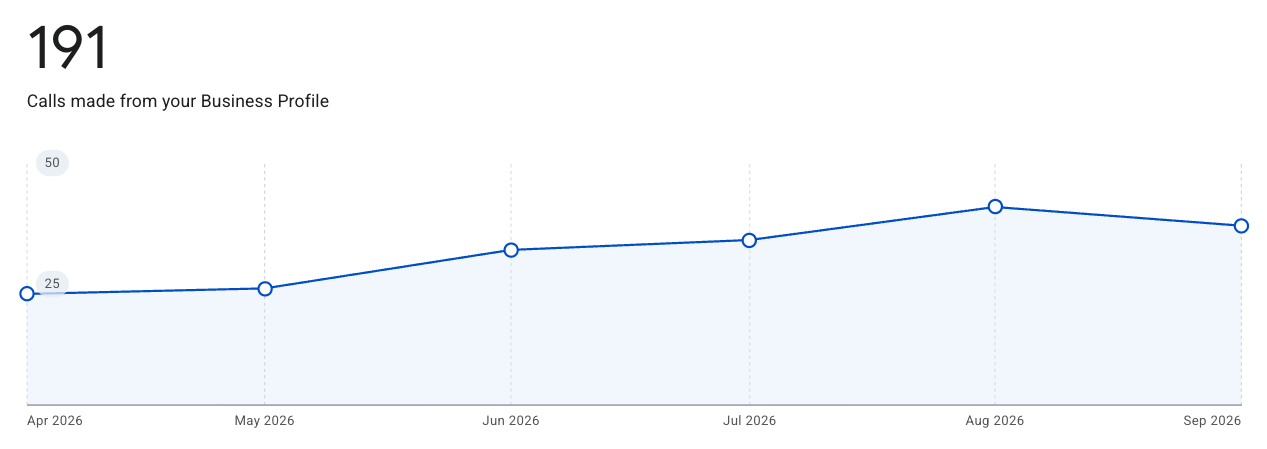
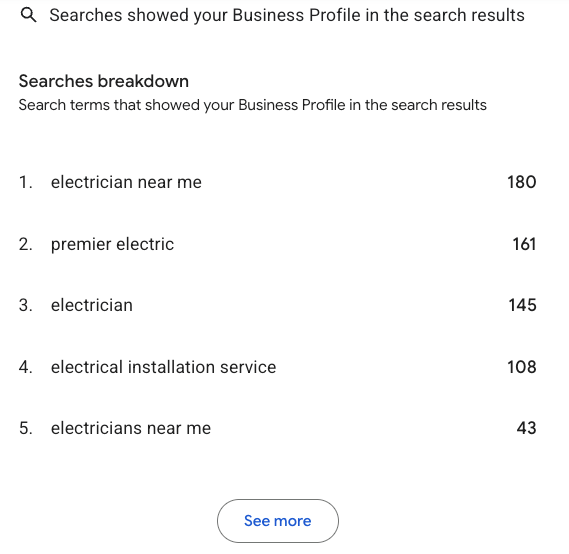
Your Google Business Profile has its own performance reports, including calls made from the listing. Review these every month, next to your website data, to see how many calls come from Maps versus your website.
When calls come in but your data doesn't show them
Click tracking only counts people who tap your number on your website. It misses people who dial it by hand, and calls that come straight from your Google Business Profile.
For a complete picture, call tracking software can assign tracking numbers and send call data to Google Analytics. For most small electrical contractors, starting with click tracking plus Google Business Profile call data is enough to see what's working.
Keep It Working: Monthly and Quarterly Checks
Monthly:
- Respond to new reviews
- Confirm your hours and service area are current
- Publish at least one Google Post
- Review phone clicks in GA4 and calls in your Google Business Profile
Quarterly:
- Test every call button and phone link on mobile and desktop
- Confirm tracking is still firing correctly
- Check that your design still works on current devices and browsers
Frequently Asked Questions
Turn Online Visibility Into Phone Calls
Getting more phone calls comes down to three things: a strong local presence on Google, a website that makes calling easy, and tracking that shows what's working. Start with the checklist above.
Want a second set of eyes?
Our Google Business Profile Audit shows what your listing is missing compared with the electricians ranking above you.
If you're not sure your website tracks calls correctly, we can set up and audit your Google Analytics.