

How to Write the Best Email Subject Line
Updated October 2026
Your email subject line has one job: give the right person a compelling, accurate reason to pay attention. It does not need to be clever, dramatic, or packed with punctuation. It needs to communicate value quickly and set the right expectation for what comes next.
There is no single formula for the “best” email subject line. The most effective approach depends on your audience, offer, brand voice, timing, and campaign goal. That is why strong email marketing combines proven writing principles with testing and performance data.
In this guide, you’ll learn how to:
- Write clear, compelling subject lines that communicate value quickly.
- Choose the right length, wording, personalization, and tone.
- Pair subject lines with preview text to strengthen your inbox message.
- Avoid misleading, spam-like, or overly promotional tactics.
- A/B test your ideas and measure clicks, conversions, and revenue—not just opens.
These points reflect current guidance emphasizing specific benefits, relevant personalization, complementary preview text, controlled testing, and business-focused performance metrics.
Start with relevance
Before trying to sound clever, ask one question: Why should this recipient care about this email right now?
A strong subject line usually connects the message to at least one of the following:
- A problem the reader wants to solve
- A benefit the reader wants to gain
- A timely update or deadline
- An action the reader needs to take
- A topic the reader has already shown interest in
Mailchimp recommends using personal, descriptive subject lines that give readers a reason to open the content. It also advises marketers to consider their specific audience and test different language instead of assuming one tactic works for everyone.
Compare these examples:
|
Too vague |
More relevant |
|
Our March Newsletter |
3 local SEO fixes for March |
|
Big news inside |
Your new lead-source dashboard is ready |
|
Don’t miss out! |
Registration closes Friday at 5 p.m. |
|
Special offer for you |
Save 20% on your spring service appointment |
The improved versions tell readers what the email contains and why opening it may be worthwhile.
Keep it short and clear
People scan crowded inboxes quickly, often on mobile devices. Your subject line should make sense before it gets cut off.
No universal perfect length exists, but current recommendations offer a useful range. Mailchimp recommends no more than nine words and 60 characters, while Constant Contact emphasizes concise subject lines and treats roughly 40 characters as valuable inbox real estate.
Use these guidelines as a starting point:
- Aim for approximately 4–9 words.
- Keep the most important words near the beginning.
- Remove filler words that do not improve clarity.
- Preview the email on mobile and desktop before sending.
- Do not shorten the subject so much that its meaning becomes unclear.
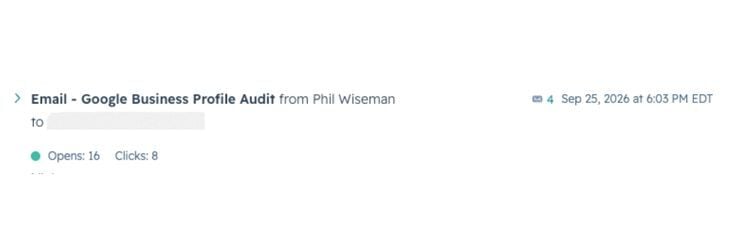
For example, “New Google Business Profile checklist” communicates more value than “A new resource you’ll love.”
Choose clarity over cleverness
A creative subject line can stand out, but cleverness should not hide the email’s purpose. Mailchimp notes that direct, descriptive language often works better than familiar seasonal slogans because it communicates a specific benefit or promotion.
A subject line such as “Fall into savings” may sound polished, but it gives the reader little information. “Save $50 on fall furnace maintenance” communicates the offer, season, service, and value immediately.
Clarity matters most in transactional or time-sensitive emails. Payment notices, appointment reminders, receipts, password resets, shipping updates, and deadline alerts should make the required information easy to recognize.
Personalize with purpose
Personalization can make an email feel more relevant, but adding a first name is only one option. Mailchimp recommends using information such as a recipient’s name or location and combining personalization with targeted messages, including birthday promotions and post-purchase follow-ups.
Useful personalization can reflect:
- The recipient’s name or company
- Location
- Previous purchases
- Service history
- Content interests
- Membership or customer status
- Stage in the customer journey
- An event the person attended
Examples include:
- “Jamie, your website audit is ready”
- “Cincinnati workshop registration closes Friday”
- “Time to schedule your annual HVAC inspection”
- “3 follow-up ideas for webinar attendees”
Only use information that the recipient knowingly provided or would reasonably expect you to use. HubSpot also cautions marketers to use consented, relevant information so personalization does not feel invasive.
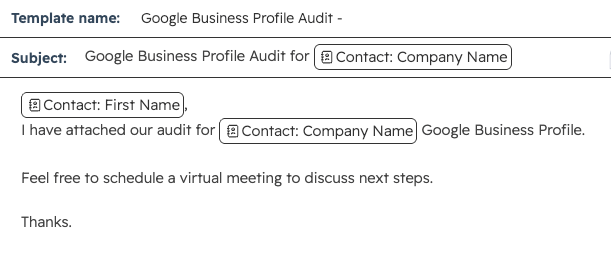
Always configure a fallback value for missing contact data. “Your report is ready” is better than sending “First Name, your report is ready.”
Lead with a benefit
A useful subject line tells the reader what they can learn, save, avoid, receive, or accomplish. This does not mean every subject line needs to sound promotional. It means the value should be recognizable.
Benefit-led examples include:
- “Find the pages costing you leads”
- “Cut reporting time with this dashboard”
- “5 ways to improve local search visibility”
- “Reserve your appointment before the holiday rush”
- “See which campaigns generated qualified calls”
Specific language is usually more persuasive than unsupported superlatives. Instead of calling a resource “amazing” or “the best,” explain what it helps the reader do.
Questions can create curiosity when they reflect a genuine concern or goal. The email should then answer the question quickly rather than using it as empty clickbait.
Strong question-based subject lines include:
- “Is your Google profile costing you calls?”
- “Which marketing channels generated leads?”
- “Ready for your spring HVAC tune-up?”
- “Are outdated service pages hurting conversions?”
Avoid questions that are too broad or disconnected from the message. “Can you believe this?” may attract attention, but it does not help the recipient understand the email’s relevance.
Add meaningful numbers
Numbers can make a subject line more specific and easier to scan. They work best when they describe something real inside the email, such as a number of tips, a dollar amount, a deadline, a percentage, or a measurable result.
Examples include:
- “7 fixes for a stronger service page”
- “Save $25 when you register by Friday”
- “Your 10-point Google profile checklist”
- “3 reports every business owner should review”
Don't add a number just to attract attention. The email must deliver the promised list, savings, statistic, or result.
Urgency can help readers act, but it must be real. A legitimate registration deadline, appointment cutoff, expiring discount, limited quantity, or time-sensitive update can belong in the subject line.
Try:
- “Registration closes Friday at 5 p.m.”
- “Final day to save 20%”
- “Only 4 consultation appointments remain”
- “Renew by October 31 to avoid interruption”
Avoid manufactured pressure such as “ACT NOW!!!” or “Last chance” when another “last chance” email will arrive tomorrow. Constant Contact recommends using urgency or exclusivity when appropriate, but also warns against excessive capitalization.
Accuracy is not only a trust issue. The Federal Trade Commission requires commercial email subject lines to accurately reflect the message’s content under the CAN-SPAM Act.
Pair it with preview text
The subject line does not work alone. In many inboxes, readers also see preview text—sometimes called preheader text—next to or below the subject line.
Use the preview text to extend the message rather than repeat it. Mailchimp recommends approximately 30–80 characters for compatibility across a range of devices, while noting that the right length depends on the message and audience.
Here are several ways to divide the work:
|
Subject line |
Preview text |
|
Find the pages costing you leads |
Use this 10-minute audit to spot weak calls to action. |
|
Registration closes Friday |
Reserve your seat for the local SEO workshop. |
|
Your Q3 lead report is ready |
See the channels that produced calls and qualified forms. |
|
Save 20% on spring maintenance |
Book online before the offer ends Sunday. |
Without custom preview text, an inbox may pull navigation labels, image descriptions, or other unintended copy from the top of the email. Review the complete inbox presentation before sending.
Use punctuation and emojis sparingly
Punctuation and emojis can add personality, but more doesn't automatically create more attention. Mailchimp recommends no more than three punctuation marks and one emoji in a subject line. It also advises using emojis to support words rather than replace them because appearance varies by operating system.
Follow these practices:
- Use sentence case instead of all caps.
- Avoid repeated exclamation points and question marks.
- Use no more than one emoji as a practical default.
- Never replace an essential word with an emoji.
- Test how the subject line renders in different email clients.
- Keep the style consistent with the brand and message.
A playful emoji may suit a retail promotion but feel inappropriate in a security notice, invoice, medical reminder, or sensitive nonprofit appeal.
Avoid deceptive tactics
A strong subject line earns attention without misleading the recipient. The FTC requires truthful subject lines, and Gmail says the subject, headers, display name, sender identity, and content should accurately represent the message.
Avoid:
- Fake “Re:” or “Fwd:” labels when the email is not part of an actual conversation
- False deadlines or scarcity
- Offers the email does not deliver
- Misleading personalization
- Unsupported guarantees
- Excessive capitalization or punctuation
- Sender names designed to look like alerts or message content
Google specifically advises senders not to begin subject lines with “Re:” or “Fwd:” unless the message is a genuine reply or forward.
Remember the sender name
Recipients evaluate the sender name and subject line together. A familiar, consistent sender name can establish context before readers read the subject line. Constant Contact recommends using a recognizable sender name to build audience trust.
Choose a format that accurately identifies the sender, such as:
- “Phil at Analytics That Profit”
- “Analytics That Profit”
- “Jane from ABC Plumbing”
Do not turn the sender-name field into another subject line. Gmail says display names should clearly and consistently identify the sender, not include urgency, promotional copy, or deceptive message indicators.
A/B test one variable
Best practices give you a starting point. A/B testing shows what works for your audience.
To run a clean subject-line test:
- Choose one question to answer, such as whether a benefit-led subject line performs better than a question.
- Create a control and one challenger.
- Change only the subject line; keep the sender, preview text, audience, email content, offer, and send time consistent.
- Split recipients into comparable random groups.
- Send both versions at the same time.
- Choose the primary success metric before launching.
- Let the test run long enough to collect enough data before declaring a winner.
- Record the result and use it to form the next hypothesis.
HubSpot recommends testing one variable at a time, dividing audiences equally and randomly, running variations simultaneously, and checking whether the result is statistically significant.
Small lists may not produce a reliable winner in a single campaign. If that applies to your business, test the same principle across several comparable sends and evaluate the combined pattern. HubSpot recommends calculating the required sample size from the baseline result, the minimum improvement worth detecting, and the desired confidence level; 95% confidence is a common standard.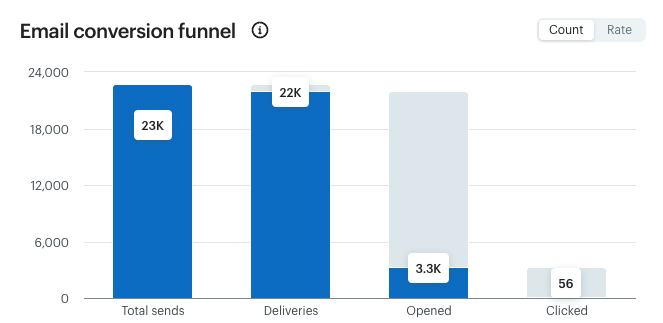
Measure more than opens
Subject lines directly influence whether recipients notice and open a message, but open rate should not be the only measure of success.
Apple Mail Privacy Protection can preload tracking pixels even when a recipient has not actively opened an email. This can inflate open rates and make open-based automations and A/B test results less reliable.
Match the metric to the campaign goal:
|
Campaign goal |
Primary metrics |
|
Generate website engagement |
Click-through rate and engaged sessions |
|
Generate leads |
Form submissions and qualified leads |
|
Promote an event |
Registrations and attendance |
|
Drive sales |
Purchases, revenue, and revenue per delivered email |
|
Start conversations |
Replies and booked meetings |
|
Protect list health |
Unsubscribes, spam complaints, and bounce rate |
HubSpot identifies click-through and conversion rates as stronger indicators of action than opens, while Mailchimp recommends monitoring clicks, conversions, bounces, unsubscribes, purchases, and attributed revenue in response to Apple’s privacy changes.[
A subject line that attracts more opens, but fewer qualified actions is not necessarily the winner.
Subject lines cannot fix deliverability
Good copy helps, but it cannot overcome a low-quality list, unwanted email, poor sender reputation, or missing authentication.
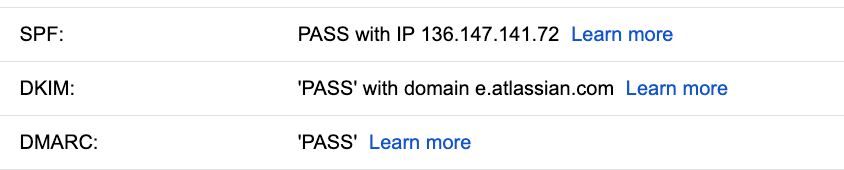
Gmail requires all senders to use SPF or DKIM authentication. Senders delivering more than 5,000 messages per day to personal Gmail accounts must use SPF, DKIM, and DMARC, maintain low reported spam rates, and support one-click unsubscribe for marketing and subscribed messages.
Protect deliverability by:
- Sending only to people who requested or reasonably expect the email
- Keeping sender information accurate and consistent
- Authenticating the sending domain
- Making unsubscribe options clear and easy
- Removing invalid addresses and managing inactive contacts
- Monitoring bounces, complaints, reputation, and delivery errors
- Avoiding purchased email lists
Gmail advises keeping spam rates in Postmaster Tools below 0.1% and avoiding rates of 0.3% or higher.

AI tools can help generate variations, shorten drafts, adjust tone, or identify different angles. They should not make the final decision without human review.
A useful prompt should include:
- The campaign goal
- The audience segment
- The offer or main message
- The desired tone
- The email body or landing-page content
- Words or claims to avoid
- A word or character limit
- The action readers should take
Ask for genuinely different approaches, such as clarity, benefit, curiosity, question, urgency, or proof. Then review every option for accuracy, brand fit, mobile visibility, privacy concerns, and alignment with the email. HubSpot recommends giving AI sufficient campaign context and treating its output as material to review and test, not a guaranteed winner.
Examples by campaign type
Use these examples as starting points, not universal formulas.
|
Campaign type |
Subject line |
Preview text |
|
Educational resource |
10 checks for a healthier Google profile |
Find missing categories, weak photos, and unanswered reviews. |
|
Webinar |
Local SEO workshop starts Thursday |
Reserve your seat and bring one visibility question. |
|
Home service reminder |
Is your spring HVAC tune-up booked? |
Choose an appointment before the first hot week. |
|
B2B report |
Your Q3 lead-source report is ready |
See which channels produced calls and qualified forms. |
|
Nonprofit appeal |
Help stock 200 weekend meal bags |
A $25 gift helps provide food for local students. |
|
Event deadline |
Registration closes Friday at 5 p.m. |
Save your place before online registration ends. |
|
Re-engagement |
Still want practical marketing tips? |
Update your preferences or pause these emails anytime. |
|
Review request |
How did we do on your recent project? |
Your feedback helps us improve the customer experience. |
Pre-send checklist
Before scheduling the email, confirm that the subject line:
- Communicates a clear and relevant reason to open
- Accurately represents the email
- Places the most important words near the beginning
- Remains understandable if truncated
- Matches the audience segment and customer journey
- Uses personalization only when it is accurate and appropriate
- Avoids unsupported claims and false urgency
- Uses punctuation and emojis sparingly
- Works with the preview text instead of repeating it
- Fits the sender name and brand voice
- Has been previewed on mobile and desktop
- Supports a measurable campaign goal
Turn attention into action
The best subject line is not the one with the most tricks. It earns attention from the right audience, sets an accurate expectation, and helps move the recipient toward a meaningful next step.
Start with clarity and relevance. Use personalization, curiosity, numbers, and urgency only when they strengthen the message. Then test one variable at a time and evaluate clicks, conversions, replies, revenue, and list health—not just opens.

Not sure what your email data is telling you? Analytics That Profit can review your subject lines, audience segments, campaign tracking, clicks, and conversions to identify practical ways to turn more email engagement into measurable business results.
- Best Practices for Email Subject Lines - Tips for subject lines · Add personalization · Be descriptive · Keep it short · Limit punctuation · ...
- Best Email Subject Line Examples - Keep it short and clear: Aim for under about 50 characters (roughly 6 to 8 words) so your subject li...
- I've Discovered 160 of the Best Email Subject Lines I' ... - A good email subject line conveys urgency, curiosity, personalization, and so much more. If you need...
- CAN-SPAM Act: A Compliance Guide for Business - Don't use deceptive subject lines. The subject line must accurately reflect the content of the messa...
- 4 Email Preheader Best Practices - Mailchimp - Email preheaders are one of the first things your readers see, so getting them right is important. F...
- Email sender guidelines - Gmail Help - Google Help - The guidelines in this article can help you successfully send and deliver email to personal Gmail ac...
- How to Do A/B Testing: 15 Steps for the Perfect Split Test - A/B testing is helpful for comparing two versions of a webpage, email newsletter, subject lines, des...
- How to determine your A/B testing sample size & time frame - Learn how to calculate the ideal sample size for A/B testing so your results are statistically signi...
- Apple Mail Privacy Protection (MPP) FAQs - In this article, you'll get answers to common questions about Apple's privacy protection (Apple MPP)...
- Email analytics: 13 email marketing metrics you should track - Open rate is useful for comparison but increasingly unreliable due to Apple's Mail Privacy Protectio...
- Can artificial intelligence write better email subject lines ... - Curious if AI email subject lines outperform human ones? Discover top AI subject line generators, ho...